You can limit Google's AI Overviews and AI Mode in two ways: per page, with snippet controls such as nosnippet, or for a whole site, with the Search generative AI setting in Search Console, which Google rolled out worldwide on 31 August 2026. Its Generative AI performance report now shows how often your pages appear in these features, as impressions. Clicks still sit in the normal Web results.
How AI Overviews and AI Mode work
Google describes both features on one page, AI features and your website. They share an approach, with differences worth knowing before you plan around them.
| AI Overviews | AI Mode | |
|---|---|---|
| What it does | Gives a quick grasp of a complicated topic, with links to dig deeper | Gives a fuller AI response with links, suited to queries that need exploration, reasoning or comparison |
| When it appears | Only when Google's systems judge it adds value beyond classic Search, so it often does not appear | Offered for queries that need further exploration |
| Query fan-out | Both may run several related searches across subtopics and data sources, so they can show a wider and more varied set of links than a classic search | |
| Models and links | The two may use different models and techniques, so their responses and links can differ | |
- A page can be pulled in for a sub-question you never targeted. Answer the follow-up questions around your main topic.
- Because the two features differ, a single "AI Overview ranking" doesn't exist. Check both over time.
- Google says appearing is never guaranteed, even when every requirement is met.
What a page needs to appear
- Indexed. The page must be in Google's index.
- Eligible to show with a snippet. No control may stop Google from creating a snippet for it.
- Included in Search generative AI features. Inclusion is the default. If someone excluded the property in Search Console, none of its pages can appear.
- Policy compliant. The page must follow Google's spam policies and Search Essentials.
Google's guide to optimising for generative AI features adds that there are no further technical requirements and that these features are built on the same ranking and quality systems as Search, so ordinary SEO remains the foundation. It says no special structured data is needed, that llms.txt files don't affect Search, and that breaking content into small chunks or rewriting it "for AI" is not required. For what to put on the page, see how to get cited in AI answers.
The controls, and what each one does
| Control | How you set it | Effect | Watch out for |
|---|---|---|---|
| Search generative AI setting | Search Console, Settings, Search generative AI. Include (default), Exclude, or Inherit from the parent property | Exclude hides your links and content from AI Overviews, AI Mode and Discover's generative AI features. You get no impressions or traffic from them | It is set per property and child properties can override a parent. It does not affect ranking elsewhere in Search, does not control AI training, and does not block indexing |
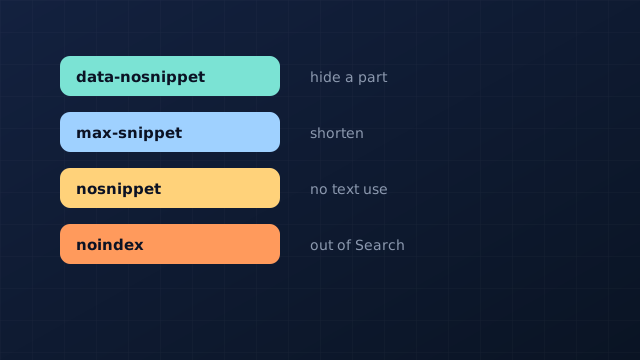
nosnippet | Meta robots tag or X-Robots-Tag | No text snippet, and the page's content is not used as direct input for AI Overviews and AI Mode | It also removes the text snippet from ordinary results. A static image thumbnail may still appear |
max-snippet:[number] | Meta robots tag, for example max-snippet:20 | Limits snippet length in characters. 0 equals nosnippet, -1 lets Google decide | Does not limit image or video previews, or structured data used for rich results |
data-nosnippet | An attribute on a span, div or section | Keeps that part of the page out of snippets | Needs valid, closed HTML. An unclosed div can hide everything after it. Don't add or remove it with JavaScript on existing nodes |
noindex | <meta name="robots" content="noindex"> or the X-Robots-Tag header | Keeps the page out of Search entirely, so it can't be a supporting link | It removes the page from classic results too. Recrawling can take days to months |
| robots.txt Disallow (Googlebot) | A rule in robots.txt | Controls crawling for Search, which Google says also governs access for its AI features | If a page can't be crawled, Google never sees its meta rules |
Google-Extended | A robots.txt token | Limits use of content for AI training and grounding in some other Google systems | Google points to it for training, not as a control over AI Overviews or AI Mode |
When page-level rules conflict, the more restrictive one applies: Google's documentation gives max-snippet:50 together with nosnippet as an example that results in nosnippet. Combine rules with commas or separate tags, and target one crawler by replacing robots with its token, such as googlebot. Google says an exclusion made in Search Console usually takes effect within one to two days, though some content can take longer because of caching.
Decide what to allow
Most businesses want their pages eligible, because a supporting link is a chance to be seen. A few have reasons to limit it: paid content, price lists that change daily, or text that is only valid with its context. Work down this list for each page type.
- Do you want a page in Google Search at all? If no, use
noindex, and stop. - Do you want your whole site out of AI features, but still in regular Search? Set Search generative AI to Exclude in Search Console, and stop.
- Is only one page or page type a problem? Use
nosnippeton it. Be aware it also removes its text snippet from ordinary results. - Is only part of a page a problem, such as a price table or member-only section? Wrap just that part in
data-nosnippet. - Do you want a snippet, but a short one? Use
max-snippet:Nwith a number that still carries your answer. - Is your worry training for other Google systems? That is the
Google-Extendedtoken, and a separate decision.
Before you exclude anything, look at your own numbers. Google suggests using the Generative AI performance report to estimate what a change would cost you, and excluded sites lose both the impressions and the traffic.
<!-- Illustrative example: allow a 200-character snippet, hide one section -->
<meta name="robots" content="max-snippet:200">
<section>
  <h2>How much does a repair cost?</h2>
  <p>Most repairs cost £120 to £450 (invented figures).</p>
  <div data-nosnippet>Member-only price list</div>
</section>How to report on AI Overviews and AI Mode in Search Console
Google's Generative AI performance report (Search) shows how many times links to your site were shown in a generative AI feature on Google Search. It covers AI Overviews and AI Mode, and Google says the list may grow. Discover has its own separate report. Google says the reports reached all websites worldwide on 31 August 2026.
| Item | What it gives you |
|---|---|
| Metric | Impressions only. The help page describes no clicks or queries in this report |
| Dimensions | Pages (the canonical URL), countries, devices and dates (in Pacific Time) |
| Filter | Search type: Web text-based, or Web multimodal (image-based searches such as Lens) |
| Counting | Two results from your site in one response count as one impression |
| Freshness | The newest data is preliminary and can change within a few hours |
| When it may be missing | The report may not appear if the site has too few generative AI impressions, or has been excluded |
Clicks are a different matter. Google says appearances in these features are also part of your overall search traffic, counted in the main Performance report under the Web search type, so clicks stay there, mixed with other search clicks. In practice, use the new report for visibility (which pages, in which countries and on which devices), and the main report for clicks.
| Source | Where it appears | What you can't see |
|---|---|---|
| Google AI Overviews and AI Mode | Generative AI performance report (impressions), plus Performance report, Web search type (clicks), per Google | Clicks specific to an AI feature, and the wording of the answer |
| Other assistants (ChatGPT, Claude, Perplexity) | Your analytics as referral traffic, and your server logs. We found no official reporting tool in the vendor documentation we read | Mentions with no click, and visits where the referrer is missing, which can land in Direct |
Three habits help. Record the date of each change to your controls or content, so a shift in impressions can be compared against it. Watch informational queries separately from branded ones, because AI features suit broad, exploratory questions. And measure the wording of the answers yourself with a fixed question set: the method is in how to run an AI visibility audit. Search Console tells you how often you appeared; only an audit tells you what the answers say.
When a control isn't working
- Check what Googlebot received. Use URL Inspection to confirm the tag or attribute is in the HTML Googlebot fetched. A rule added by JavaScript or blocked by robots.txt may be missed.
- Allow time. Google says recrawling for page-level controls can take from several days to several months. You can request a recrawl in Search Console.
- Validate the HTML.
data-nosnippetonly works in valid HTML with closed tags. - Look for conflicts. A restrictive rule elsewhere, such as a stray
nosnippetfrom a plugin or template, overrides a more permissive one. - Check the property. The Search Console setting is per property, and a child property can override its parent.
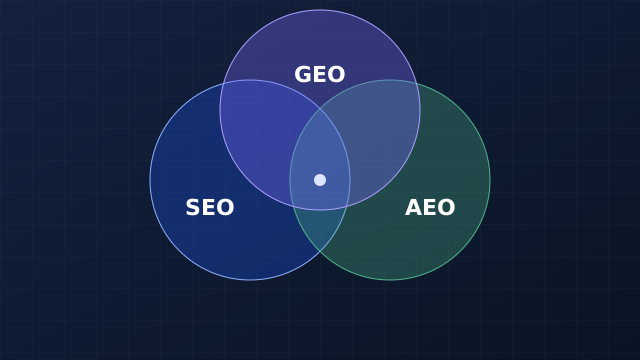
To check the rest of your search foundation, including crawl access, use the technical SEO audit, and see AI crawlers and robots.txt for other assistants' search bots. The wider picture of how Google's AI features fit with SEO is in SEO vs AEO vs GEO, and general ranking work is in how to improve Google rankings.
Quick answers
Can I opt out of Google AI Overviews and AI Mode?
Yes. Set Search generative AI to Exclude in Search Console to leave AI Overviews, AI Mode and Discover's generative AI features for the whole property, or use nosnippet and data-nosnippet on individual pages or sections. Excluded sites receive no impressions or traffic from these features.
Does blocking Google-Extended remove me from AI Overviews?
No. Google points to Google-Extended for AI training and grounding in some other systems, and to the Search Console setting for AI Overviews and AI Mode.
Can I see how many clicks come from AI Overviews?
Not separately, according to Google's documentation. The Generative AI performance report gives impressions. Clicks stay in the main Performance report under the Web search type.
How long does an exclusion take to work?
Google says content is typically excluded within one to two days after the change goes live, though some can take longer because of caching and propagation.
Sources and methodology
- Google Search Central: AI features and your website, for how the two features work, eligibility and best practices.
- Search Console Help: Search generative AI control, for the include, exclude and inherit options, scope, timing and what the setting does not affect.
- Search Console Help: Generative AI performance report (Search), for the metric, dimensions, filters and caveats.
- Google Search Central Blog: Introducing Search Generative AI performance reports and Google: New opportunities, control and insights for website owners, for the June 2026 announcement and the 31 August 2026 worldwide rollout.
- Google Search Central: Optimizing your website for generative AI features, for what Google says is and isn't needed.
- Google Search Central: Robots meta tag, data-nosnippet and X-Robots-Tag, for the syntax and effect of
noindex,nosnippet,max-snippetanddata-nosnippet, and how conflicting rules combine. - Google Search Central: Spam policies, for the policy compliance requirement.
Methodology. Every statement about Google's features, controls and reports comes from the pages above, read on 7 November 2026. This is a fast-moving area: Google introduced the Search Console setting and the report in June 2026, and the help pages may change, so check them before acting. The control ladder and the decision path are our own way of organising the documentation, not Google's. The markup example is illustrative with invented figures. What other assistants report to site owners is based only on the vendor documentation we read, which describes no reporting tool; we did not test it.
Reviewed .